Linux Post-Install Automation
How This Started
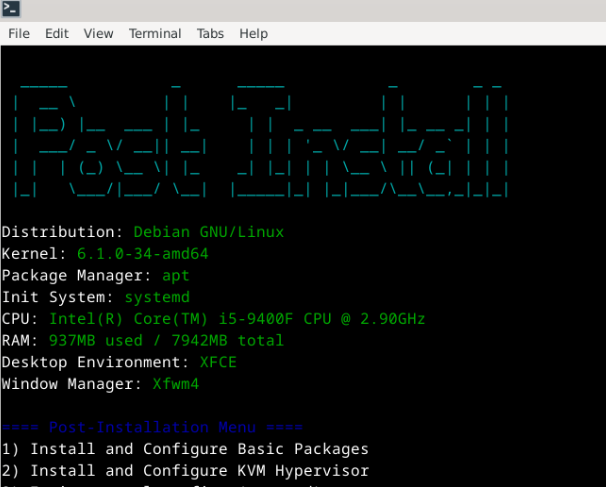
Every time I set up a fresh install, which happens fairly regularly between new hardware, VMs, and wanting a clean environment to test something on, I'd go through the same mental checklist. Same packages, same dotfiles, same aliases, same editor config. After doing it manually enough times I put together some basic scripts to handle it. Then I thought: why not make it interactive? An ASCII menu, some choices, a bit of structure. This was one of the first Bash scripts I actually put effort into, and it shows in places, but I wanted to keep it here as a reference point for where things started.
Overview
A Bash script for automating package installation and environment configuration on fresh Linux installs. It supports Debian, Fedora, and Arch-based systems, and has a wee interactive menu so you can pick what you actually want rather than installing everything blindly.
Key Features
- Multi-distro support - Works across Debian, Fedora, and Arch-based systems
- Package management - Automated installation of my "must have" tools, utilities, and applications
- Configuration deployment - Dotfiles, aliases, and environment setup
- Interactive selection - Choose specific packages and configurations to install
Supported Categories
- Development tools - Git, editors, compilers, and language runtimes
- System utilities - Monitoring tools, network utilities, and productivity apps
- Desktop applications - Media players, browsers, and communication tools
- Custom configurations - SSH keys, shell aliases, and personal preferences
Technical Implementation
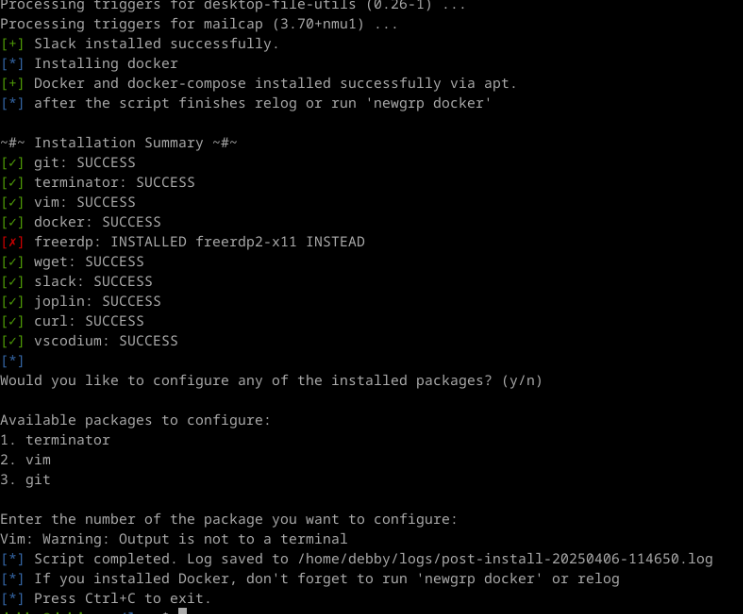
The script detects which package manager is available - apt, dnf, or pacman - and handles everything from there. It logs what it installs, has basic error handling so a failed package doesn't abort the whole run, and is structured in a way that makes it easy to add new packages without digging through the core logic. Nothing groundbreaking, but it does the job and saved me a lot of repetitive typing.
Why This Matters
Setting up a new system used to take a little repetitive work. With this automation, I can go from fresh install to fully configured environment just how I like it in minutes. It's especially useful when testing new distros in VMs or setting up new hardware. Again, I have scripts for this, but they don't have an ASCII menu...
Next Steps
- Add support for more package managers (Nix, Flatpak)
- Expand configuration templates for different use cases, I'm a diehard XFCE fan, but I suppose I believe my friends when they say other DEs are good. Maybe.
- Integration with cloud dotfiles repository for syncing across machines